下载
略
安装
安装
tar -xzf oceanbase-all-in-one-*.tar.gz
cd oceanbase-all-in-one/bin/
./install.sh
cd ../../
source ~/.oceanbase-all-in-one/bin/env.sh
启动
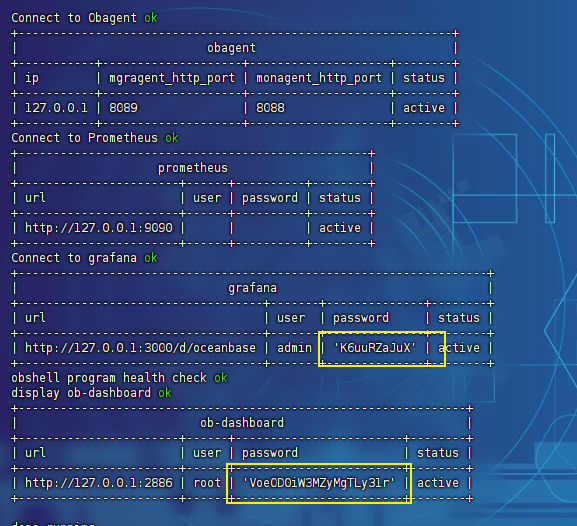
注意看账号的密码
obd demo # 启动
obd cluster restart demo # 重启
可能的错误
[ERROR] OBD-1007:(127.0.0.1) open files must not be less than 20000 (Current value: 1024)……………………
解决方案一
先保证内存在3G以上
然后可以尝试执行如下配置
vim /etc/security/limits.conf
在最后新增
* soft nofile 655360
* hard nofile 655360
* soft nproc 655360
* hard nproc 655360
* soft core unlimited
* hard core unlimited
* soft stack unlimited
* hard stack unlimited
查看状态
obd cluster list
使用
连接数据库
# 密码在日志中
obclient -h127.0.0.1 -P2881 -uroot@sys -Doceanbase -A -p
# 密码:
# root VoeOD0iW3MZyMgTLy31r
# admim K6uuRZaJuX


# 设置远程访问
GRANT ALL PRIVILEGES ON oceanbase.* TO 'root'@'%';
设置远程连接
# 创建用户
CREATE USER 'demo'@'%' IDENTIFIED BY '12345678';
# 设置密码
GRANT ALL PRIVILEGES ON oceanbase.* TO 'demo'@'%';
工具链接
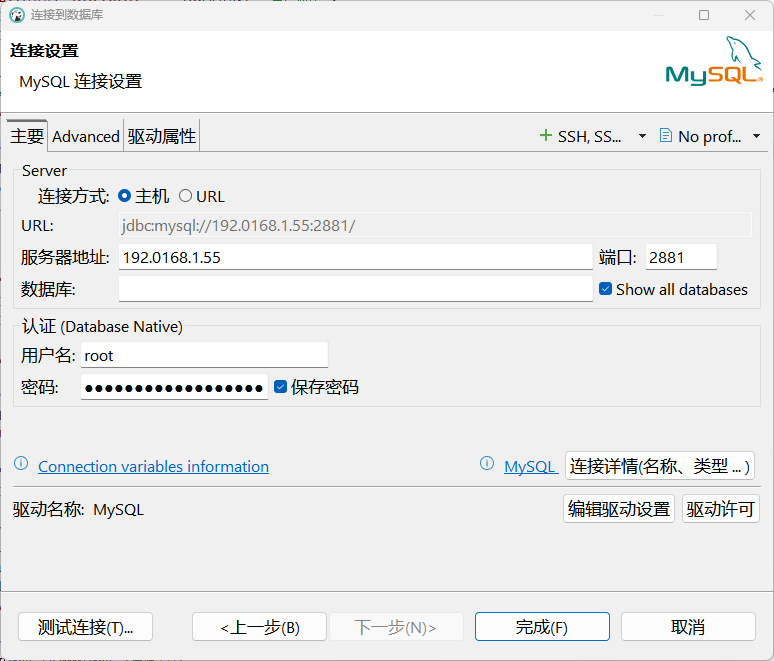
使用和mysql配置一致即可